General |


|
General |
|
Technical release notes 2016 release - General
tg1. |
In this release, the version on the splash screen for Corsa MyCorsa and MyCorsa NxT is 2016. This Long Term (LT) release is supported by BCT for a maximum of three years. |
||||||||||||||||||||||||||||||||||||
tg2. |
This release contains database changes with respect to the 2015-1 release and earlier. The changes apply to the Corsa database and the Audit database. For ETL, there are no database changes.
Information about the number of tables and indexes of the various databases for this release:
'No change' means as compared to the Corsa 2015-1 release.
Please mind: there are additional conditions to consider regarding database related matters when upgrading to the Corsa 2016 release. You can find more information below. |
||||||||||||||||||||||||||||||||||||
tg3. |
With the Corsa 2016 release the transition from OpenEdge 10.2B (32-bit) to Progress OpenEdge 11.6 Service Pack 1 (32-bit) has been implemented. It is a technological upgrade of the underlying platform of Corsa. This way BCT is following the new developments of Progress OpenEdge and is thus prepared for the future.
Please read and use the relevant installation instructions when installing OpenEdge 11 database, AppServer and WebSpeed. Some things concerning installation and configuration have changed compared to OpenEdge 10. |
||||||||||||||||||||||||||||||||||||
tg4. |
Prior to carrying out the 2016 database upgrade it is necessary to run a pre-conversion program on the existing Corsa database. This program checks for any corrupt records in the database and deletes them. The following applies to the three supported database platforms: •Progress: the pre-conversion program will be executed automatically during the automatic database upgrade. •Oracle: the pre-conversion program needs to be run manually in an existing Corsa environment before executing the database upgrade. •Microsoft SQL Server: the pre-conversion program needs to be run manually in an existing Corsa environment before executing the database upgrade.
The pre-conversion program is released in two ways: Variant 1: The program is included in the PL-files of the UCR of June 2016 (UCR 06 - 2016) and more recent, for the 2013-4, 2014, 2014-2 and 2015-1 release. Variant 2: The program is released separately (pre_conv_hand_p10.r) so that it can be run manually if the PL-files of UCR 05 - 2016 (or more recent) are not present.
Variant 1: Instruction for running pre-conversion program: •Log in with user 'system' in Corsa •Go to 'System' | 'Installation' | 'Programs' •Uncheck option 'Defined programs' •Enter the following line: std/upgrade/preconv/pre_conv_hand_p10.r •Click on 'OK' •Click on 'Yes' or 'Ja' when asked 'Start pre-conversion?' •Afterwards a dialogue is shown: 'Pre-conversion has finished'. Click on 'OK'.
Variant 2: Instruction for running pre-conversion program: •Log in with user 'system' in Corsa •Go to 'System' | 'Installation' | 'Programs' •Uncheck option 'Defined programs' •Browse to the location where the pre-conversie program was placed and select 'pre_conv_hand_p10.r' and click on 'Open' •Click on 'OK' •Click on 'Yes' or 'Ja' when asked 'Start pre-conversion?' •Afterwards a dialogue is shown: 'Pre-conversion has finished'. Click on 'OK'.
The log file bct_upgrade.log show the total time it took to run the pre conversion program: (you can find this in %TEMP% of the user that started the Corsa session) ================================================================================ End update PRE-CONVERT Elapsed time : 00:02:23 ================================================================================
No mutations should be made in de database after running the pre-conversion program until the Corsa 2016 release has been installed and taken into use.
Some remarks: •The pre-conversion program is the same for all supported database platforms. •The pre-conversion program can be used for all Corsa releases that are based on Progress OpenEdge 10. •The pre-conversion program can be run while users are active in Corsa, MyCorsa or MyCorsa NxT. However we advise to run the program without any users active, so that the chance of any new corrupt records occurring is very small. •The pre-conversion program can be run multiple times. •The lead time of the pre-conversion program depends on the total number of records in all tables. |
||||||||||||||||||||||||||||||||||||
tg5. |
When upgrading Corsa an extra action needs to be done for the Progress OpenEdge database platform. The database structure needs to be converted to OpenEdge 11. This conversion can be run by executing the 'db_convert_to_oe11_<dbname>.cmd' script that you can find in folder 'bct\data\db_files' of the new directory structure (see tg6).
This script will do the following: •A 'repair' and a 'truncate' of the existing database against Progress OpenEdge 10 by using the Progress OpenEdge 10 tools that come included •A conversion of the database to the OpenEdge 11 format |
||||||||||||||||||||||||||||||||||||
tg6. |
The default directory structure that BCT uses has been changed. The most important changes concern: •References to production (prod) and test (test) environments have been removed out of names and contents of the files. •There are no longer separate files for production and test environments. •Version numbers and figures in general have been removed from the names of the client and server software folders. •The DLC Enviroment Variable has been added to several .cmd files in connection with OpenEdge 11 compatibility. •Changed registry files (.reg file) for the making of the ODBC connection to the Corsa database in the case of a Microsoft SQL Server database platform
Because of these changes the use of the new directory structure is mandatory when installing the Corsa 2016 release. We advice you to make a backup of the old directorystructuur when upgrading. |
||||||||||||||||||||||||||||||||||||
tg7. |
When using the Corsa 2016 release the following components (when applicable) need to be installed or upgraded to the right version: •Corsa 7.2 Web Service version 7.2.161.1 / 062 •Corsa 7.2 StUF-BG 2.04 Web Service version 2.04.1604 / 030 •Corsa 7.2 BBC Schaubroeck Web Service version 7.20.161.1 •Corsa/TaskService version 7.20.1603.1 •Corsa/Enterprise Search (see also tg8) oBCT Message Broker (BCT BerichtenCentrale or BCE) MSI 2.0.2 oCorsa/Enterprise Search deployment for the BCT Message Broker (BCT BerichtenCentrale or BCE) 2.0.9 oCorsa/Solr MSI 2.0.3 •SharePoint on Corsa version 2.0.12 •ABBYY FineReader Engine version 11.1.1601 •MyCorsa NxT Office Add-in version 2.0.4
These components are backwards compatible to older releases. For more information please refer to installation manuals and/or the CORSA 7.2 Availability Document. |
||||||||||||||||||||||||||||||||||||
tg8. |
The following minimum versions need to be used for Corsa/Enterprise Search: •BCT Message Broker (BCT BerichtenCentrale or BCE) MSI 2.0.2 or higher •Corsa/Enterprise Search deployment for the BCT Message Broker (BCT BerichtenCentrale or BCE) 2.0.9 or higher •Corsa/Solr MSI 2.0.3 or higher
When upgrading to the Corsa 2016 release a so called re-index needs to be done. You can find more information about this in the Corsa/Enterprise Search installation manual.
The so called grouping functionality for Corsa/Enterprise Search has been removed in order to improve the performance and scalability for large amounts of data. Now, a smaller amount of linked information (of cases and folders) is indexed for each document. Because of this a one time re-index is needed.
Because of the removal of this grouping functionality the size of the Solr index will decrease to a greater or lesser extent. This is dependent on the amount and type of content. |
||||||||||||||||||||||||||||||||||||
tg9. |
The Corsa 2016 release is the last release in which MyCorsa is released. Corsa releases newer than the Corsa 2016 release will not contain MyCorsa any more. We advice you to transfer to MyCorsa NxT. |
||||||||||||||||||||||||||||||||||||
tg10. |
Browser support as of the Corsa 2016 release:
•Support for MyCorsa NxT on Apple iPad •MyCorsa NxT is supported in combination with the Microsoft Edge browser
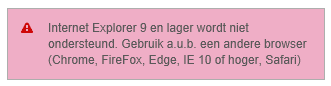
Please mind! Internet Explorer 9 is no longer supported. MyCorsa NxT shows a warning that Internet Explorer 9 is no longer supported when a user tries to use it to reach MyCorsa NxT and the user cannot proceed. E.g. the Dutch warning:
Please refer to the 'BCT Browser Support' document for more information. |
||||||||||||||||||||||||||||||||||||
tg11. |
BCT now supports Windows 10 for Corsa and MyCorsa NxT.
However, MyCorsa is not supported on Windows 10! |
||||||||||||||||||||||||||||||||||||
tg12. |
BCT now supports Microsoft Office 2016 (32-bit) for Corsa, MyCorsa and MyCorsa NxT.
Microsoft Office 2016 (32-bit) is not supported yet as supporting application for Neevia Document Converter Pro. You need to use Microsoft Office 2013 (32-bit) as supporting application for Neevia Document Converter Pro. |
||||||||||||||||||||||||||||||||||||
tg13. |
A schema holder is used for the communication between Progress OpenEdge and an Oracle or Microsoft SQL Server database. Before, a schema holder would be created in the 1252 format and then converted to UTF-8. As from the 2016 release the schema holder will be created directly in UTF-8 format. Please use the scripts available in the default directory structure for creating a schema holder. |
||||||||||||||||||||||||||||||||||||
tg14. |
BCT now supports Windows 10 for Corsa/ADR 4.5 (minimum version 4.5.1602.2). |
||||||||||||||||||||||||||||||||||||
tg15. |
With the transition to Progress OpenEdge 11.6 a new ODBC driver was also introduced for the communication between Progress OpenEdge and Microsoft SQL Server. In the past we used the default 'SQL Server' driver. With the Corsa 2016 release this is the 'OpenEdge 11.6 Wire Protocol Driver for MS SQL Server'.
This driver will be installed by the Corsa Connector MSI in the '<installation folder>\appl\ODBC'. The following registry files have also been modified: •odbc_corsa_32-bit_os.reg: creating data source for 32-bit operating systems •odbc_corsa_64-bit_os.reg: creating data source for 32-bit operating systems
You can find these .reg files in the default directory structure that BCT delivers. In '<installation folder>\bct\clientsoftware\config\misc\odbc' to be more precise.
How to create an ODBC data source based on the new driver: •Open the .reg file that corresponds to your OS •Edit the relevant fields (please refer to the installation manual of Progress OpenEdge AppServer/WebSpeed and the Corsa Connector MSI for more information) •Delete the old 'SQL Server' ODBC data source •Save, close and double click on the .reg file in order to run it
The Corsa Connector MSI will check whether the driver has already been installed and will not install again if that is the case.
This also means that the driver will not be installed by the Corsa Connector MSI on machines that contain Progress OpenEdge 11 - Data Server for Microsoft SQL Server. In that case the driver will have already been installed by the Progress OpenEdge setup. When creating the ODBC data source you should therefore enter the location of the driver in the OpenEdge installation folder instead of the installation folder of the Corsa Connector MSI. |
||||||||||||||||||||||||||||||||||||
tg16. |
BCT has made some changes because of which the Corsa 2016 release is now FIPS compliant. Several peripheral components had already been made FIPS compliant in recent versions. In order to guarantee full FIPS compliancy you need to use the versions of peripheral components that have been named in tg7. |
||||||||||||||||||||||||||||||||||||
tg17. |
As addressed in tg7, the Corsa 2016 release needs to be used in combination with a minimal MyCorsa NxT Office Add-in version. This add-in version has been compiled against the Microsoft .NET Framework 4.0 Full Package. Other changes in the add-in concern: •Microsoft Office 2016 (32-bit) support •FIPS compliancy
The add-in setup requires the Microsoft .NET Framework 4.0 Full Package and the setup will try to install this requirement on Windows 7, Windows 2008/R2 if detected that it is not present. More recent operating systems already contain the .NET 4.0 framework (via so called 'Features'), so it cannot be installed via the setup.
You can perform a regular update in order to install the new add-in, just like before. So you do not need to remove the add-in before reinstalling the new version. |
||||||||||||||||||||||||||||||||||||
tg18. |
As from the Corsa 2016 release the 'startup type' of the Windows services of the various Corsa components should be set to 'manual' (in stead of 'automatic'). Please use the respective scripts 'start_processes.cmd' and 'stop_processes.cmd' for starting and stopping the services. You can find these scripts in the default directory structure.
Also 'auto start' of the OpenEdge database and/or AppServer and WebSpeed brokers should be turned off in OpenEdge Explorer.
The stop/start scripts will handle the right order of stopping and starting processes and prevent errors and warnings in log files. Also these scripts will clean up any unused processes/files and rotation of log files.
At the moment of writing this the following Windows services are concerned: •BCT BCE (Message Broker) •CorsaCMIS •BCT Apache2 •BCT AS •BCT TaskService •BCT CaptureService •CorsaSolr •CORSATaskService •Tomcat6 •Tomcat7 •DSservice •IDT PDF Service •DCStart •AdminService11.6(32-bit) (also turn off of 'auto start' of the components database, AppServer and WebSpeed)
It is important to create a scheduled task on each server Corsa so that the processes will be stopped and restarted periodically. In addition, this scheduled task should also ensure that 'start_processes.cmd' is carried out when starting the server. |